QuickUp Zone
QuickUp窗口排列
类似powertoys的workspace,QuickUp自4.0版本起可以尝试调整任务应用窗口的位置与尺寸。
之所以是“尝试”,是因为Windows没有公开的api实现窗口贴靠;另外,没有任何可靠方式在启动应用后准确获得应用窗口,更何况win32软件架构多种多用、还有越来越多的winui应用。因此QuickUp只是尝试获取应用窗口、再尝试调整窗口,如果这个行为使得你想要运行的应用表现很奇怪,请不要使用。该功能的实现比较复杂,想知道原理的请参考QuickUp源码,显然,QuickUp做不到像powertoys一样的出色,更何况pwty也存在误判情况(不过极少)。
遵循以下技巧,可以更好使用该功能:
- 目标使用可执行文件全称(win32),想要打开文件的话放到参数里,对于uwp应用,QuickUp会自行判断;
- 不要对多窗口复杂软件(应该很少见)使用该功能;
- 可在“设置->高级->窗口排列重试次数”设置重试次数,可能提高窗口的发现概率,但过高的重试次数会影响体验,对于大型软件,启动速度慢,但或许没必要窗口排列;
- 布局界面下方三个按钮中,橡皮擦是取消布局操作,确认按钮仅对窗口布局信息进行确认,与是否保留圆角无关;
- 默认不保留圆角,如果不是贴靠排列而是自定义布局,可以选择保留圆角;
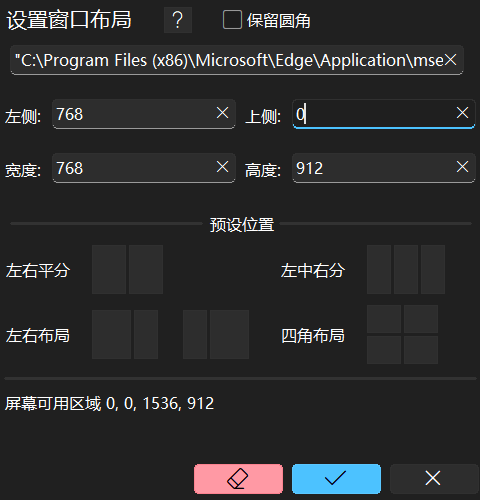
QuickUp window arrangement
Similar to powertoys’ workspace, QuickUp can try to adjust the position and size of the task application window since version 4.0.
The reason why it is a “try” is that Windows does not have a public api to implement window snap; in addition, there is no reliable way to accurately obtain the application window after launching the application, not to mention the win32 software architecture is multi-used, and there are more and more winui applications. So QuickUp is just trying to get the application window and then try to adjust the window. If this behavior makes the application you want to run behave strangely, please don’t use it. The implementation of this function is relatively complicated. If you want to know the principle, please refer to the QuickUp source code. Obviously, QuickUp cannot be as good as powertoys, not to mention that there are also misjudgments in pwty (but very few).
Follow the following tips to make better use of this feature:
- The target uses the full name of the executable file (win32). If you want to open the file, put it in the parameters. For uwp applications, QuickUp will make its own judgment;
- Don’t use this feature on complex multi-window software (which should be rare);
- You can set the number of retries in “Settings-> Advanced-> Window Arrangement Retries”, which may increase the probability of window discovery, but too high the number of retries will affect the experience. For large software, the startup speed is slow, but it may not be necessary for Window snap;
- Among the three buttons at the bottom of the layout interface, the eraser cancels the layout operation, and the confirm button only confirms the window layout information and has nothing to do with whether the rounded corners are retained;
- No rounded corners are retained by default. If you are not using preset layout but customized layout, you can choose to retain rounded corners;